JonesZylon product sell sheet library
Use these product overviews to prepare a selection or service discussion. Keep the exact model specification with the quote when checking capacities, dimensions, power requirements and options.
Which overview matches your purchasing question?
Use the linked overviews to identify a family and build a shortlist of model specifications to check.
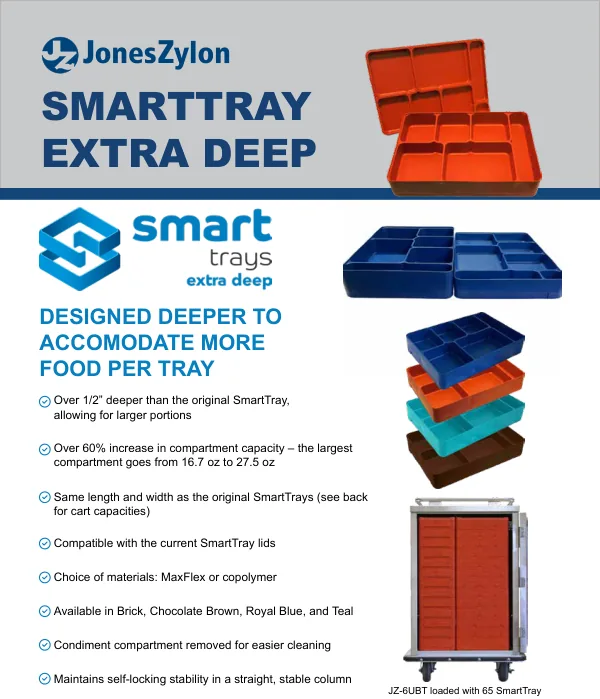
The Heavy Duty Upgrade sheet describes a package for a defined set of carts. Ask for the current component schedule and eligible model before writing the option into a purchase request. The Uptime Maintenance Kit sheet supports a spare-parts discussion; match the contents to the equipment already installed. SmartTray XD has its own overview for the tray discussion, with separate specifications in the model library.
The municipal financing flyer sets out Equipment Finance Agreements for qualifying public entities, with a non-appropriations clause included. The terms, and what to ask the finance provider before a payment schedule reaches a budget request, are on the municipal financing page.
Sell Sheets
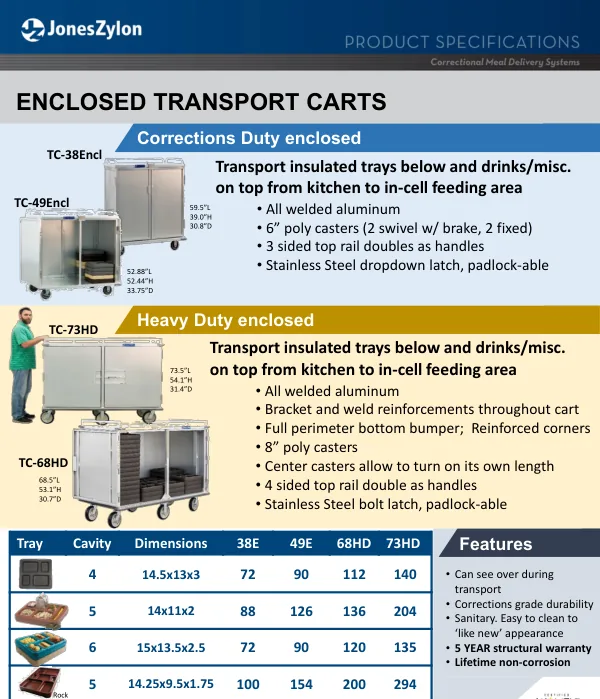
Enclosed Transport Carts (PDF)
Enclosed transport-cart overview for route and load planning.
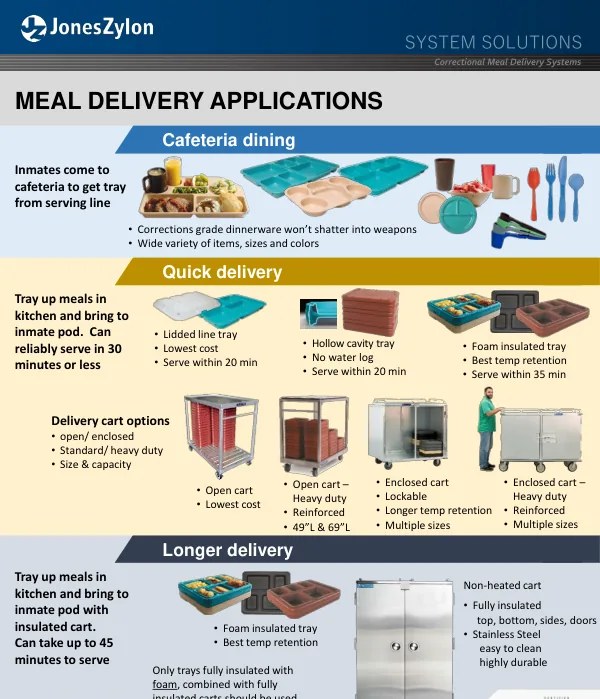
Meal Delivery Systems (PDF)
Meal-delivery system overview for preliminary selection discussions.
SmartTray-XD-One-Pager (PDF)
SmartTray XD product overview; use the model specification for detailed selection.
Insulated Trays Fact Sheet (PDF)
PRTS insulated tray options and the carts built for them.
Uptime Maintenance Kit (PDF)
Spare-parts kit overview; request the contents matched to the installed cart.
Heavy Duty Upgrade (PDF)
The heavy duty upgrade package. Ask for the current component schedule and the eligible models before writing it into a purchase request.
Municipal Financing (PDF)
Equipment Finance Agreements for municipalities, state and local governments and other qualifying public entities, with a non-appropriations clause included. Contact Austin Frederici on the flyer to start one.
How do you turn a product review into a facility check?
Use a sell sheet to identify the product family. Use the matching model specification and quote for dimensions, capacity, electrical requirements and options.
Frequently asked questions
Does a sell sheet establish current availability?
A sell sheet supplies a product-family overview, while the model specification supplies the printed details.
Request a Quote Schedule a Virtual Demo
Sources
- JonesZylon PDFs linked individually in the document-family lists above. Each entry supplies its source document.
- For model-specific details, see the specification library.