Correctional cart and tray compatibility guide
TL;DR
- Match the exact cart, tray, lid and loading arrangement. The table lists the cart and tray pairings JonesZylon documents print, with the number of trays each cart holds. For any other pairing, ask JonesZylon.
- Keep tray capacity separate from complete meals, especially when hot and cold food travel in separate pieces.
Which trays fit each JonesZylon cart?
This table shows which trays fit each JonesZylon cart and how many trays the cart holds, as printed on the cart’s specification sheet or in the ServeSmart Buying Guide.
| Cart | Tray | Trays per cart |
|---|---|---|
| ServeSmart JZ-54 [5] | SmartTray, lid on top of each stack | 54 |
| ServeSmart JZ-6UBT-RH [5] | SmartTray, lid on top of each stack | 90 |
| ServeSmart JZ-136 [5] | SmartTray, lid on top of each stack | 136 |
| ServeSmart JZ-168 [5] | SmartTray, lid on top of each stack | 162 |
| ServeSmart JZ-168XL [5] | SmartTray, lid on top of each stack | 170 |
| ServeSmart JZ-192XL [5] | SmartTray, lid on top of each stack | 190 |
| JZA-54 ambient cabinet [1] | JZ SmartTray | 54 |
| JZ SmartTray XD | 39 | |
| 9000-series segregation tray | 45 | |
| 5000-series segregation tray | 78 | |
| 4000-series segregation tray | 90 | |
| JZA-136 ambient cabinet [2] | JZ SmartTray | 136 |
| JZ SmartTray XD | 96 | |
| 9000-series segregation tray | 140 | |
| 5000-series segregation tray | 224 | |
| 4000-series segregation tray | 288 | |
| TC-90 enclosed transport cart [3] | SmartTray, copolymer or MaxFlex | 90 |
| PRTS-5000 insulated tray | 39 | |
| PRTS-4000 insulated tray | 30 | |
| JZHA-120 heated/ambient cart [4] | 9000-series segregation tray, on shelves | 120 |
| 9000-series segregation tray, stacked without shelves | 160 | |
| 5000- or 4000-series segregation tray, on shelves | 180 | |
| 5000- or 4000-series segregation tray, stacked without shelves | 252 |
For a cart and tray pairing not listed here, ask JonesZylon.
What must a compatibility request include?
- Photograph the cart identification and record the full model, including suffixes and temperature configuration.
- Record the tray and lid codes from purchasing records or markings. Include material and whether the order mixes existing and replacement pieces.
- Describe whether trays rest on slides, shelves or stacks. Show the top closure and the way staff remove each meal.
- List the desired count by compartment and include beverage or other items that occupy space.
Include photographs of the present loading arrangement if replacing a cart around an existing tray fleet. A sample that fits an empty cabinet can still require a different loading plan when all meals, lids and diet identifiers are present. Document the tested arrangement so receiving staff can compare it with the delivered equipment.
How do standard and deep SmartTrays affect loading?
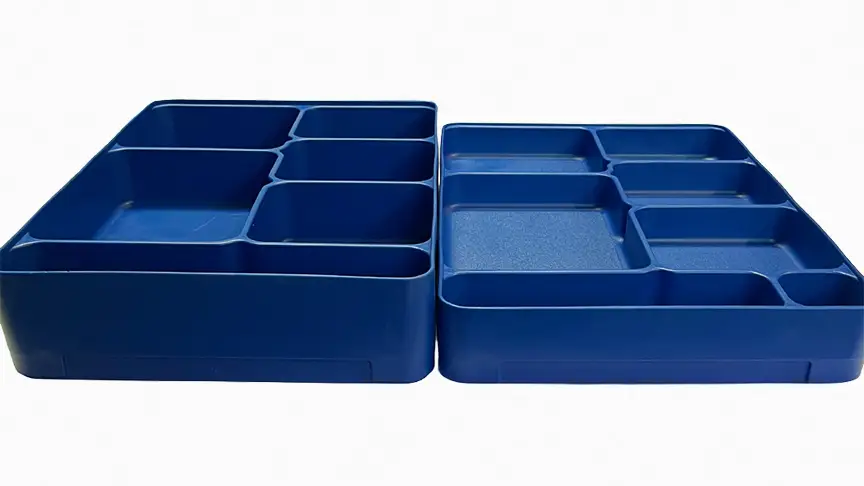
The JZA-54 and JZA-136 sheets print separate SmartTray and SmartTray XD counts. Use the row that names the tray you intend to order. [1] [2] The SmartTray family page separates tray and lid choices. Put the exact tray SKU on the quote.
The ServeSmart guide shows top-of-stack lids in its loading descriptions. [5] Confirm whether the proposed workflow closes every meal individually or closes each stack at the top. That decision belongs in the capacity confirmation and the sample evaluation. Do not transfer the documented count to a different lid arrangement without checking it.
How do you turn tray counts into meals and trips?
Count the people served in one dispatch window and the pieces used for each person’s meal. When hot and cold portions use separate trays, record each compartment's load and the number of matched complete meals. Include special diets that need a separate dispatch rather than assuming they fill every remaining position.
Divide the dispatch requirement by confirmed complete-meal capacity and round up to whole loads. Record separately how many carts move together, how many return trips staff make and when equipment becomes available for the next unit. Repeat the calculation by route. Size the fleet for the overlapping service windows.
Will the loaded cart clear the delivery route?
Record the narrowest door opening, elevator entrance and turning point with facilities and security staff. Check how a cart is held at controlled doors and where staff stand to unload it. Include protruding handles, door swing and the location used to park a cart during service. Check the published cabinet dimensions against those measured clearances.
For reference, the JZA-54 sheet prints a height of 47.80 inches, width of 21.50 inches and depth of 38.25 inches. [1] Use actual site measurements alongside the exact model sheet. Confirm caster and brake options through cart options; do not infer a towing or loading limit from wheel appearance.
How should staff check a proposed configuration?
Use the menu, actual portions and intended lids in a controlled evaluation. Load in the proposed sequence, identify special diets and check that staff can remove a meal without disturbing the remaining stacks. Confirm doors and latches close with the complete load. Record any lost positions or handling adjustments and send those observations back with the configuration request.
Then follow the approved return, wash, dry and storage cycle. Count the pieces awaiting drying before deciding that the same inventory will cover consecutive meal periods. Keep temperature acceptance under the facility's approved food service process.
What if your pairing is not in the table?
Ask JonesZylon about an unlisted cart, a mixed material load, a different lid or a segregation tray the sheet does not name. Send the cart model, the tray and lid codes and the loading arrangement with the request. Use the answer to complete the loading schedule.
For a replacement purchase, attach the approved configuration to the RFP response and purchase order. Include its revision date, the sample used and the person who accepted the loading arrangement. Use ServeSmart for the system overview and transport carts for individual equipment options.
Frequently asked questions
Does the cart model number tell me its meal capacity?
Use the capacity row for the exact tray and loading arrangement. Count complete meals separately if each meal uses hot and cold tray pieces.
Can I use an unlisted tray in a JonesZylon cart?
Send the cart, tray and lid codes and the proposed arrangement before treating it as a supported pairing.
Does a standard SmartTray count also apply to XD?
Use the separate XD count when the cart sheet supplies it.
Talk to a JonesZylon corrections specialist.
800-848-8160 | solutions@joneszylon.com | 305 Center Street, West Lafayette, OH 43845
Sources
- JZA-54.pdf (manufacturer document). /pdf/Equipment/Ambient%20Carts/JZA-54.pdf (accessed 2026-09-08)
- JZA-136.pdf (manufacturer document). /pdf/Equipment/Ambient%20Carts/JZA-136.pdf (accessed 2026-09-08)
- TC-90.pdf (manufacturer document). /pdf/Equipment/Transport%20Carts/TC-90.pdf (accessed 2026-09-08)
- JZHA-120.pdf (manufacturer document). /pdf/Equipment/Dual%20Temperature%20Carts/JZHA-120.pdf (accessed 2026-09-08)
- ServeSmart Buying Guide.pdf (manufacturer document). /pdf/servesmart/ServeSmart%20Buying%20Guide.pdf (accessed 2026-09-08)